Why are the IDs for the snippets in the TOC-file, but not in the Snippet itself?

This section is for programmers. Please use it for all discussons on interfacing help with your applications and related subjects.

Moderators: Alexander Halser, Michael Schwarzl

Post Reply
es_david
Posts: 17
Joined: Tue Apr 15, 2025 10:24 am

Why are the IDs for the snippets in the TOC-file, but not in the Snippet itself?

Unread post by es_david »

Hi,

just got a short question ;)

I'm trying to identify snippets and while being on the search how to solve this came across the IDs linked to snippets in the TOC-files.

Now I ask myself
» why are the (Snippet)IDs in the TOC files, but no IDs in the snippet files itself?
» are those IDs unique?
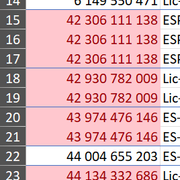
» is there a certain "formular" which is used to create them? I got some 9 digit, 10 digit, and so on ID, but for sure not so many snippets.
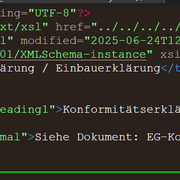
» What is the version entry for (Snippet files) and why is it always 2?

Image Image Image

Would it be possible to add some more content the snippet xml? a unique ID, a language marker and a state integer?

🫣😁🫣
User avatar
Tim Green
Site Admin
Posts: 7818
Joined: Mon Jun 24, 2002 9:11 am
Location: Bruehl, Germany
Contact:

Re: Why are the IDs for the snippets in the TOC-file, but not in the Snippet itself?

Unread post by Tim Green »

Hi David,

The ID is actually the filename of the XML topic or snippet file, so the ID is right there all the time. There's no need to store it in the file as well. That would be redundant.

Important: Note that when publishing to HTML, all upper case letters in topic IDs/filenames are downcased in the HTML filenames.

If you're referring to the numeric IDs in the TOC, however, those are not the IDs of the snippets or topics, but of the TOC entries. That is just the standard timestamp of the entry, created when it was created. It is unique and permanent and is used primarily when comparing versions of projects that have been translated.
Regards,
Tim (EC Software Documentation & User Support)

Private support:
Please do not email or PM me with private support requests -- post to the forum directly.
es_david
Posts: 17
Joined: Tue Apr 15, 2025 10:24 am

Re: Why are the IDs for the snippets in the TOC-file, but not in the Snippet itself?

Unread post by es_david »

Thanks for the quick reply.

Would it be possible to add some more tags the snippet xml? a language marker and a status integer?

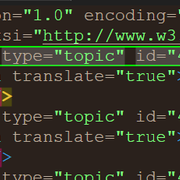
topic language="EN" condition="1" status="90 - Global" modified="2025-06-24T12:01:18.303+02:00" lasteditedby="x" version="2" xmlns:xsi=""

This would help a lot

🫣😁🫣
User avatar
Tim Green
Site Admin
Posts: 7818
Joined: Mon Jun 24, 2002 9:11 am
Location: Bruehl, Germany
Contact:

Re: Why are the IDs for the snippets in the TOC-file, but not in the Snippet itself?

Unread post by Tim Green »

If you save snippet files as full topics instead of as selections, you will already have the last edited by and timestamp data. I've passed your request on to the dev team for the other metadata.
Regards,
Tim (EC Software Documentation & User Support)

Private support:
Please do not email or PM me with private support requests -- post to the forum directly.
es_david
Posts: 17
Joined: Tue Apr 15, 2025 10:24 am

Re: Why are the IDs for the snippets in the TOC-file, but not in the Snippet itself?

Unread post by es_david »

Yes, I know and will use the date+time info too.

Thanks for forwarding the request, would be very helpful if this (language and condition) could be added.
User avatar
Alexander Halser
EC-Software Support
Posts: 1101
Joined: Mon Jun 24, 2002 7:24 pm
Location: Salzburg, Austria
Contact:

Re: Why are the IDs for the snippets in the TOC-file, but not in the Snippet itself?

Unread post by Alexander Halser »

Hi David,
why are the (Snippet)IDs in the TOC files, but no IDs in the snippet files itself?
are those IDs unique?
is there a certain "formular" which is used to create them? I got some 9 digit, 10 digit, and so on ID, but for sure not so many snippets.
The ID attribute in every TOC entry is a basically random number that is unique throughout the project. Every TOC node gets such an internal ID when it is created and keeps this ID over its entire lifetime. The IDs are used to track multi-user changes in the TOC and to compare and update language siblings. These IDs only refer to TOC entries, they have nothing to do with topic XML files. If a TOC node is missing an internal ID, Help+Manual assigns one. If there is a duplicate ID within a project, it's auto-corrected when you open this project (with a warning message). Remember: a missing or wrong ID is not a big deal, they are required to track multi-user changes and changes in language siblings by the Synchronize function in H+M and the Translation Assistant.
What is the version entry for (Snippet files) and why is it always 2?
That's the XML schema version. Note that when you edit a topic with a newer version of H+M (which introduces an XML schema update), the edited topic receives the newer version. But unaltered topics that have not been modified for years still bear the old version flag. They are generally compatible with newer versions but when edited with an older version of Help+Manual, the software might issue a warning about possible data loss.
Would it be possible to add some more content the snippet xml? a unique ID, a language marker and a state integer?
The ID of a snippet is the file name without extension. Same for topic files. There is no additional ID in the snippet or topic files, it's only the file name and this must be unique throughout a project. Topics may contain an additional time stamp when the topic was last edited. We have implemented that a couple of years ago to keep track of chronological changes (e.g. when comparing language siblings). Before that, we relied on the time stamp of the topic file. But when using version control systems, this is not a reliable indicator, as these systems may change the file time stamp at their own discretion.

As for the language, what do you need this for? Help+Manual assumes 1 language per project. The project language is stored in the .HMXP file configuration and when you publish HTML, the language marker is exported with the HTML file. If every topic had its own language marker, that could be rather confusing. Especially if you change the project language later on. The project language really only matters for CHM files and PDF, as these file formats are not (or not fully) Unicode capable. In Help+Manual itself, you don't notice any difference whether you enter English text or Greek, because it's all Unicode. For Webhelp, the language is additional information for Google & co.

Regarding the state integer - what would that be? Topic status is not part of the topic XML file, it's assigned on top of that in the help project file list. Same for the build tags.

Custom Meta Tags in Topics

That said, you can have as many meta tags in a topic or snippet as you want. Help+Manual does in fact write <meta> tags if you (a) add a topic description and/or (b) assign a feature image. That information ends up as <meta> tags in the topic.

Code: Select all

<topic template="Default" modified="2025-09-29T17:13:49.437Z" lasteditedby="Alexander" version="2">
  <title>New Topic</title>
  <meta name="DESCRIPTION" translate="true" value="Topic Description is a &lt;meta&gt; tag. Feature image, too!" />
  <meta name="PICTURE" translate="true" value="690839.jpg" />
  <body>
    <header>
      <para styleclass="Heading1">New Topic</para>
    </header>
    <para styleclass="Normal">Enter topic text here.</para>
  </body>
</topic>
You can add your own <meta> tags here. Help+Manual will read and preserve them when changing the topic. There is just no visual editing option for additional meta tags, except the XML editor.
Example:

Code: Select all

  <meta name="DESCRIPTION" translate="true" value="Topic Description is a &lt;meta&gt; tag. Feature image, too!" />
  <meta name="PICTURE" translate="true" value="690839.jpg" />
  <meta name="MYMETA" value="Hello world!" />
If you would like to use such a topic meta tag in the output, you can refer to it with a custom variable: <%TOPICMETA:NAME%>. This is both possible in the topic directly or in the topic HTML template that is used to export the topic.
You do not have the required permissions to view the files attached to this post.
Alexander Halser
Senior Software Architect, EC Software GmbH
es_david
Posts: 17
Joined: Tue Apr 15, 2025 10:24 am

Re: Why are the IDs for the snippets in the TOC-file, but not in the Snippet itself?

Unread post by es_david »

Thanks for this very helpful reply!

My goals are:

» Lock versions of Snippets (this is where i would use the state integer (in progress, in translation, released)) I'll look into git for that too.
» Have a unique ID for each snippet, that is "hidden" in the XML and cannot be changed by the 0-8-15 user (except ofc in the XML-Code Editor).
» Link translations of snippets by an unique marker (the unique ID from above) and distinguish them by the language marker

» Track in translations (copy) which snippets are not up to date anymore (Not what changed, but that something has changed based on the timestamp)
» Get an overview of all snippets that are in a folder structure and the translation state

» Keep all this data in database

» A visual info about the version, when I open an *.hmxp that is original language
» A visual info about the version and translation state, when I open an *.hmxp that is not the original language

Your input helps me a lot to solve these steps. The meta data concept will provide all the basics for the job.
Post Reply